
Operations Tracking
Detailed Tracking of Machine Operations
Overview
The Operations Tracking section in Zerynth Production Insights provides detailed information on the actual start and end of each specific operation performed on production machines within a selected time frame.
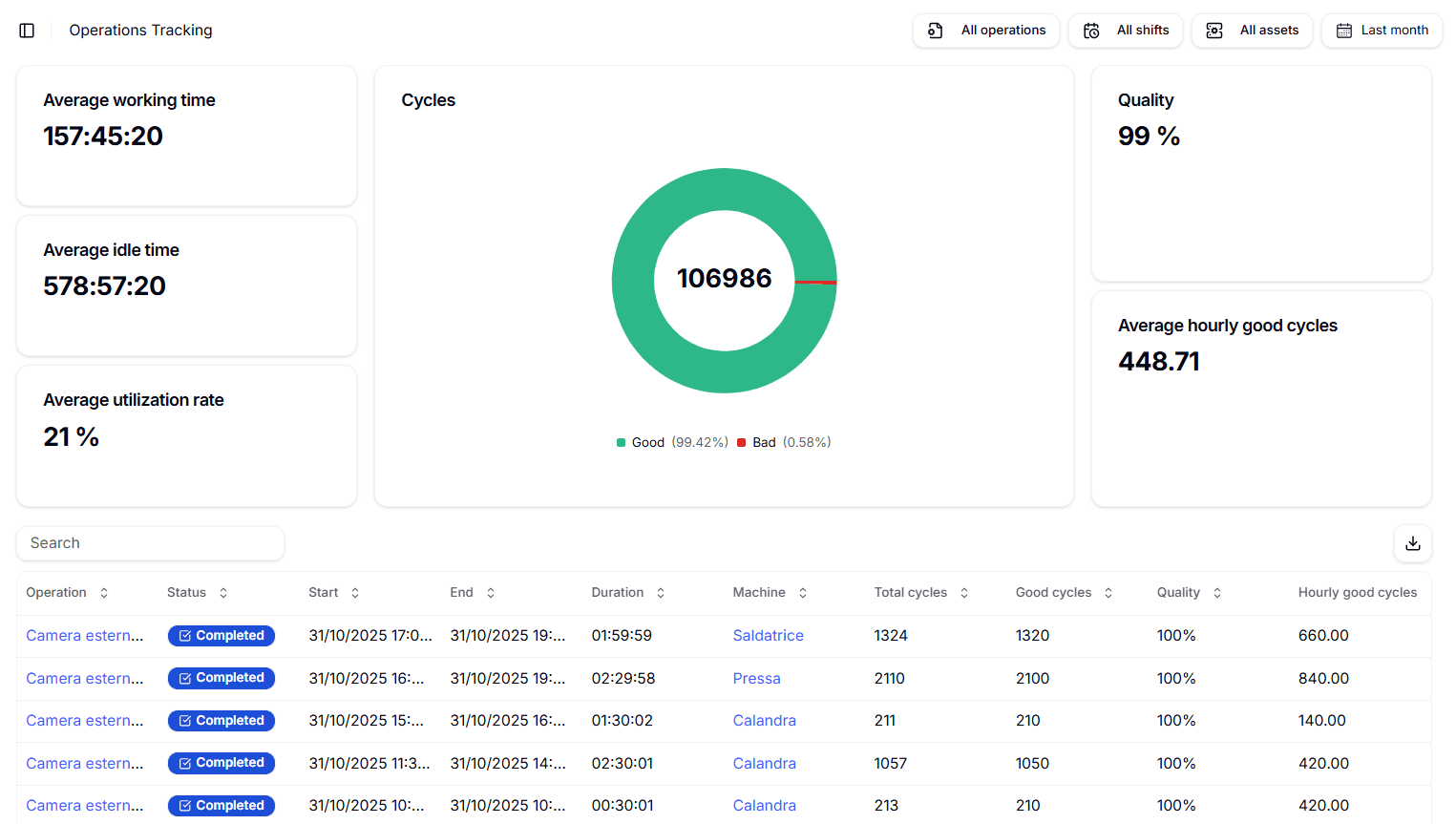
Previously, the platform offered aggregated data on key productivity KPIs for operations. Now, Operations Tracking enables users to access granular details, including the exact start and end times of each operation, its status (completed or ongoing), the machine involved, the operation duration, and key productivity indicators such as the number of defective cycles and the average number of “good” cycles per hour.
This enhanced detail complements the aggregated insights from the Productivity tab, helping users better understand production dynamics and identify inefficiencies. It supports strategic decisions about when and where to execute specific operations to meet productivity and consumption goals.
Key Features
- Dashboard for Operational Efficiency:
- View detailed start, stop, and duration times for each operation as executed.
- Quality KPIs and the number of compliant cycles per hour.
- Session-Level Productivity Monitoring
- Track the average utilization rate of machines during individual production sessions.
- Active Operation Tracking
- Operational status.
- Operation duration.
- Involved machine.
- Total and good cycle counts.
- Production rate.
- Intuitive Interface
- Real-time data visualization.
- Supports quick, strategic decisions.
- Facilitates overall productivity optimization.
The Operations Tracking feature provides a powerful tool for optimizing efficiency within production environments. By offering detailed insights into machine operations, it becomes easier to pinpoint areas of inefficiency or underperformance. This granular visibility allows users to address specific issues, such as unbalanced workloads or operational delays, leading to a more streamlined and productive manufacturing process.
Access to real-time data also empowers users to make faster, more informed strategic decisions. When issues arise — whether related to machine downtime, defective outputs, or process bottlenecks — the availability of up-to-date information enables immediate intervention. This capability minimizes disruptions and ensures smoother production workflows.
Furthermore, the ability to closely monitor and control all aspects of production activities enhances operational oversight. With a clearer understanding of machine performance, managers can make adjustments that directly contribute to profitability. This level of control helps maximize the return on investment in equipment and labor.
Benefits One of the most significant advantages of Operations Tracking is its ability to reduce waste. By identifying defects and inefficiencies as they occur, users can act promptly to address problems before they escalate, resulting in less downtime and fewer resources wasted on faulty production cycles.
The platform also supports a data-driven approach to decision-making. Actionable insights derived from detailed operation data enable businesses to fine-tune their processes and boost overall performance. This approach not only improves operational efficiency but also provides a solid foundation for long-term strategic planning.
Additionally, the comprehensive monitoring capabilities ensure complete visibility into all production activities. Whether it’s identifying idle time, analyzing productive versus non-productive operations, or tracking quality metrics, users can gain a thorough understanding of the factors affecting their production outcomes.
Icons and Messages
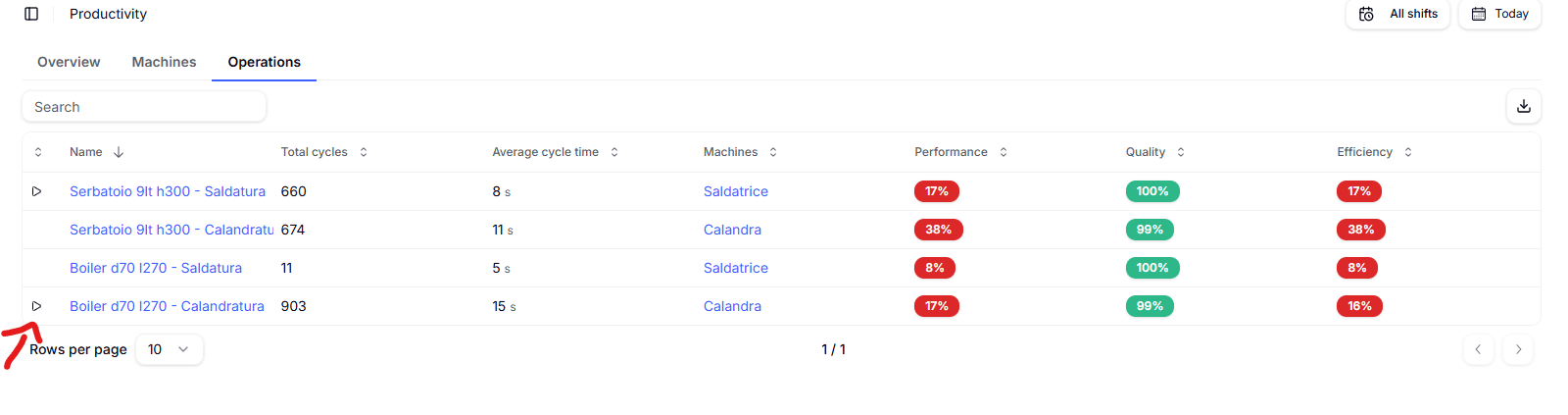
The operation currently running on a given machine is indicated by a dedicated icon, shown by the arrow in the figure.
Running Operation The operation currently running on a given machine is indicated by a dedicated icon, shown by the arrow in the figure.
Operations Without an Ideal Cycle Time Set As previously explained, the Production Insights App can calculate the Performance indicator associated with a specific Operation only if the ideal cycle time for that Operation has been previously set in the SETTINGS section. If an Operation does not have an ideal cycle time configured, the App cannot correctly calculate the Performance indicator, resulting in an inaccurate overall OEE calculation. To promptly alert the user about Operations without an ideal cycle time set, a red banner appears at the top of the Machines and Operations page in the Production Insights App, as shown in the figure.
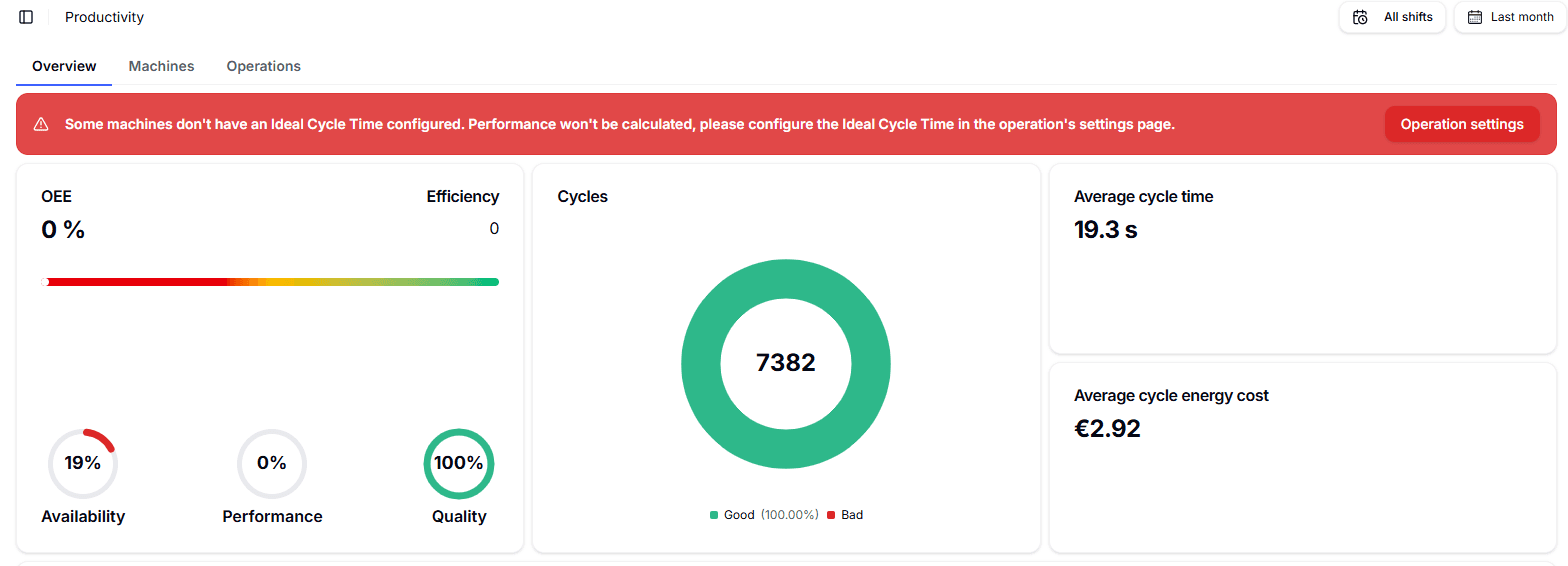
By clicking the SET OPERATIONS button, you are redirected to the SETTINGS / OPERATIONS page, where you can verify that all operations have an ideal cycle time set. After setting the ideal cycle time for the operations that were missing it, the banner automatically disappears within a few minutes. NOTE If it is not immediately clear which Operation does not have an ideal cycle time set, it can be easily identified by a dedicated icon (indicated by the red arrow in the figure below) available on the PRODUCTION INSIGHTS / MACHINES page.