
General
Manage general configuration, API keys, imports, and workspace deletion.
General
The General section contains the core configuration and management tools for the current workspace.
From this page, you can:
- Read the workspace name
- View immutable workspace identifiers
- Manage API keys
- Import basic settings from another workspace
- Delete the workspace (Danger Zone)
Workspace Information
At the top of the page, you will find the primary workspace metadata.
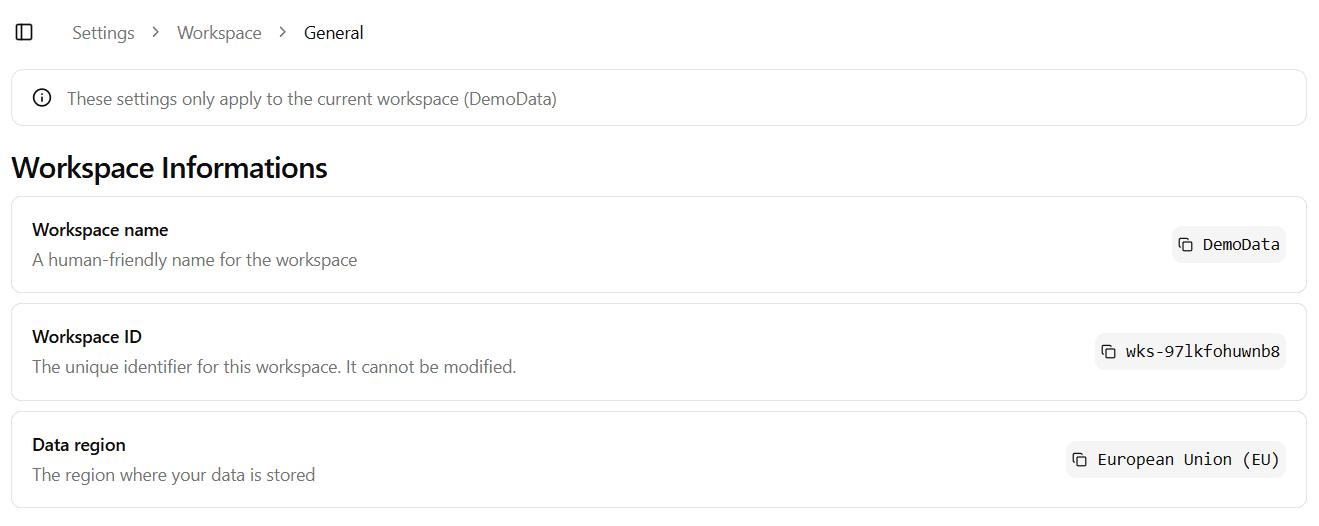
Workspace Name
A human-friendly name used to identify the workspace across the platform.
- This name is visible in navigation, selectors, and references.
- It can be modified at any time.
- Changes are applied immediately after saving.
Use a clear and recognizable name, especially if your organization manages multiple workspaces.
Workspace ID
The unique identifier assigned to the workspace.
- Automatically generated.
- Cannot be modified.
- Used internally for system-level operations and integrations.
If you need to reference the workspace in external integrations or support requests, use this ID.
Data Region
Indicates the geographical region where the workspace data is stored.
- Defined at workspace creation time.
- Cannot be modified.
- Determines data residency and infrastructure location.
If you require a different data region, a new workspace must be created.
API Keys
The API Keys section lists all generated API keys associated with the current workspace.
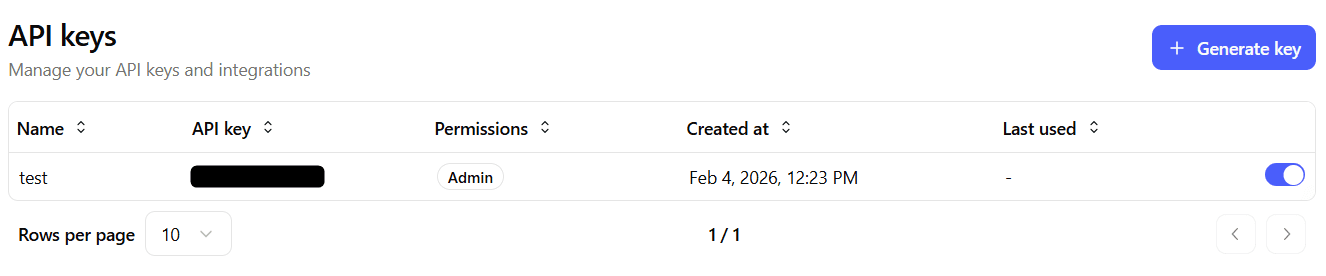
The table includes:
- Key name or identifier
- API key value (partially masked for security)
- Permissions or scopes assigned to the key
- Creation date
- Last used date
- Status (Active / Inactive)
Activating or Deactivating API Keys
You can:
- Activate an inactive key to restore access.
- Deactivate an active key to immediately revoke access.
Deactivating a key prevents it from being used in API requests but does not delete it. This allows temporary suspension without losing configuration history.
Deactivating a key will immediately block all integrations or scripts using it.
If a key is permanently compromised, generate a new key and deactivate the old one.
Import Basic Settings
The Import section allows you to import basic configuration from another workspace within the same organization.

This feature is useful when:
- Creating a new workspace based on an existing one
- Standardizing configurations across multiple workspaces
- Accelerating setup for similar production environments
You can select a source workspace and import supported configuration elements into the current one.
Only compatible and allowed settings are imported. Existing configurations may be overwritten depending on the selected options.
Carefully review the configuration after completing the import.
Danger Zone
The Danger Zone contains destructive actions that permanently affect the workspace.

Delete Workspace
Deleting a workspace:
- Permanently removes all associated data
- Cannot be undone
- Immediately revokes access for all users
You will be asked to confirm the action before deletion is completed.
This operation is irreversible. Make sure all required data has been exported or backed up before proceeding.
Only users with the appropriate administrative permissions can delete a workspace.