
Machine Configurations
Define Machine Configurations, link machines, configure ideal and suggested cycle times, and add operator parameters.
Machine Configurations
The Machine Configurations section allows you to define and manage reusable production configurations for the current workspace.
Machine Configurations is the new name for what older UI and docs called Operations. Some APIs, integrations, or legacy screenshots may still use the term operation.
In Zerynth Production Insights, a Machine Configuration represents a named production setup that can be linked to one or more machines.
It is used to:
- Calculate performance metrics such as OEE and Performance
- Associate ideal cycle times to linked machines
- Organize production analysis around repeatable machine setups
- Expose operator parameters in the Smart Operator Interface (SOI) when a configuration is selected
This lets Zerynth evaluate machine behavior in a more precise context than a generic machine aggregate.
What a Machine Configuration Includes
Each Machine Configuration includes:
- A Code used as the persistent identifier for integrations and production tracking
- A Name used in the UI, reports, and analysis pages
- One or more linked machines with machine-specific ideal cycle times
- Optional parameters that operators can fill when applying the Machine Configuration in SOI
Parameters
Parameters are the main extension introduced with Machine Configurations.
A parameter can be used to capture operator input at execution time, such as a tool ID, recipe revision, speed, material, or another value that matters for the selected configuration.
Where Parameters Come From
Visible parameters can come from two places:
- Asset parameters: reusable parameters defined for a machine in Asset Manager
- Machine Configuration parameters: additional parameters defined directly inside the Machine Configuration form
Reusable asset parameters are managed in Asset Manager. This page focuses on how those parameters are used inside Machine Configurations.
Parameter Definition
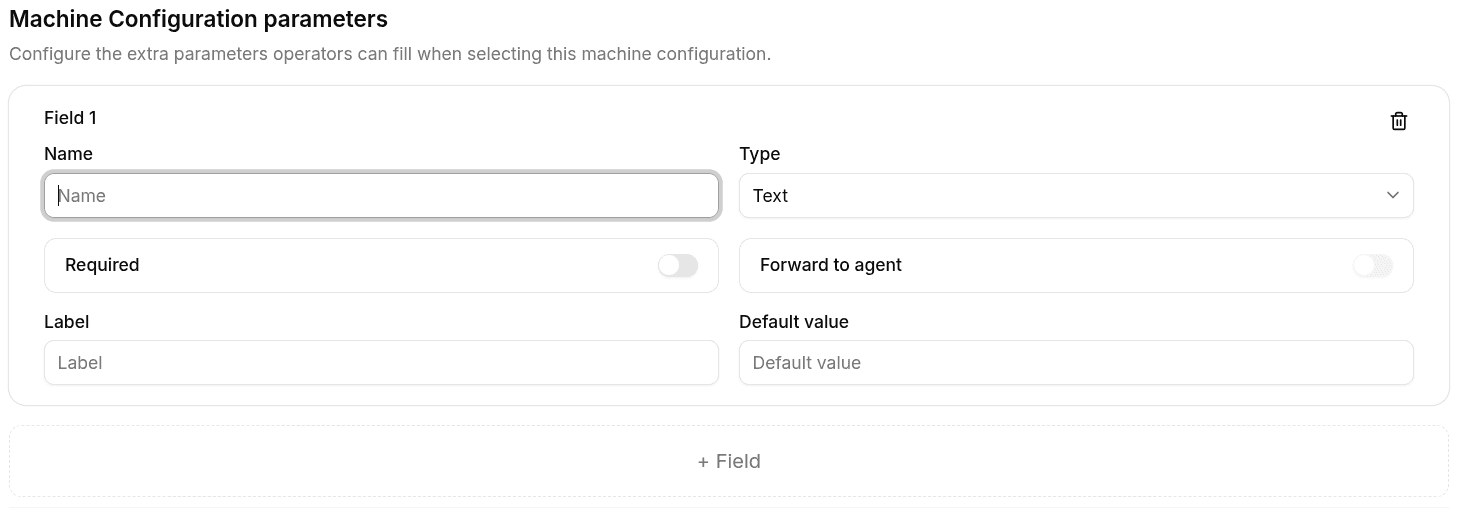
Each parameter can include:
- Name - Label shown to users
- Type -
text,number, orselect - Required - If enabled, the operator must fill the parameter before applying the configuration
- PLC value - If enabled, the submitted value is forwarded to the device or PLC flow
- Options - Available choices when the parameter type is
select - Properties - Additional metadata reserved for advanced or future use
Behavior in SOI
When an operator selects a Machine Configuration in SOI:
- The system shows the parameters for that configuration.
- Required parameters must be filled before the configuration can be applied.
- Submitted values are routed according to the parameter setup.
In practice:
- Parameters marked as PLC value are forwarded to the device or PLC path
- Other parameters are recorded in the platform event flow
Machine Configurations Overview
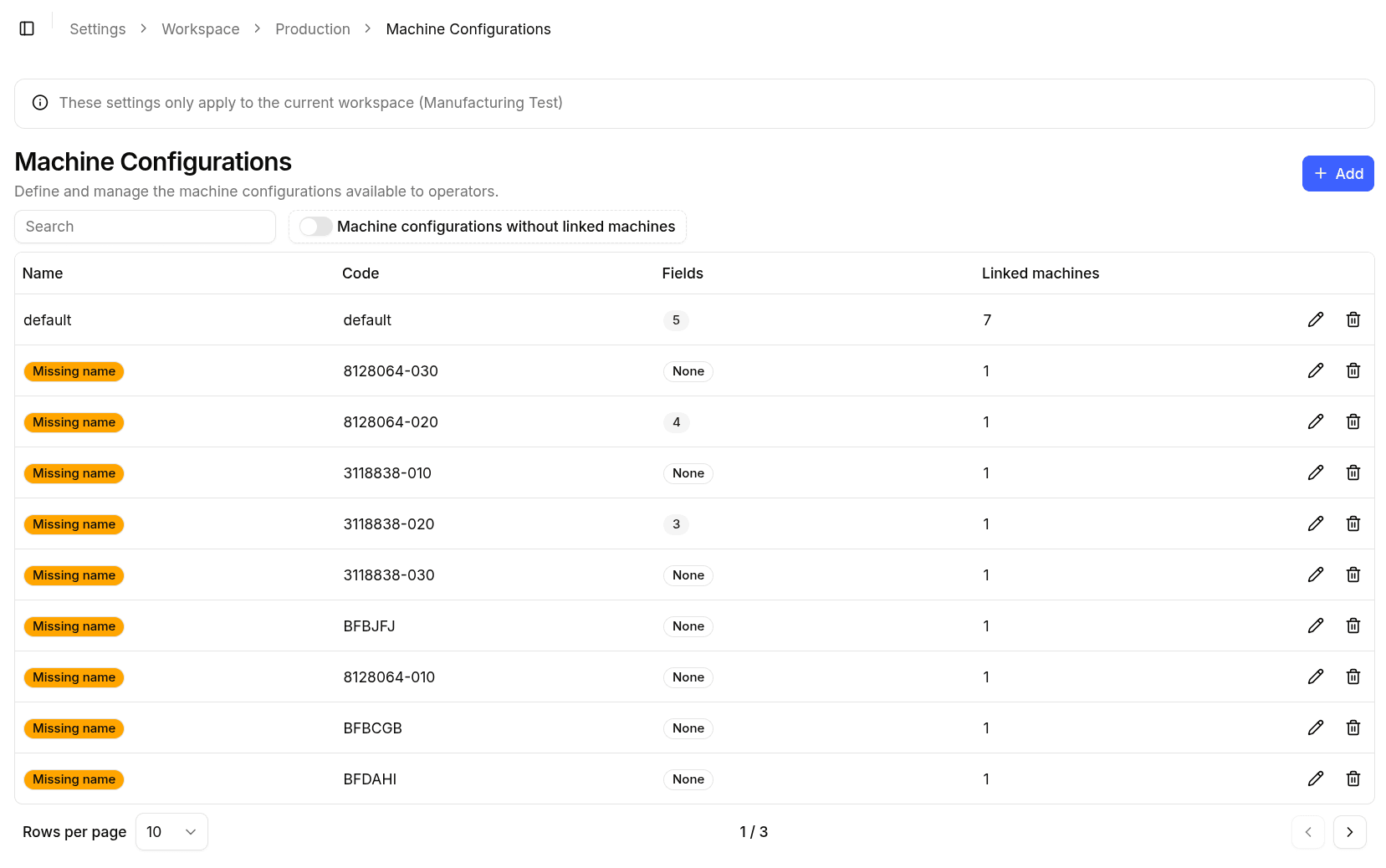
The main page displays a table listing all configured Machine Configurations.
The table includes:
- Name - Human-readable name of the Machine Configuration
- Code - Mandatory company-defined identifier
- Linked machines - Number of machines or assets associated with the Machine Configuration
- Actions - Edit and Delete buttons
From this page you can:
- Create a new Machine Configuration
- Edit an existing Machine Configuration
- Delete a Machine Configuration
Missing Name
Machine Configurations can be automatically created by devices that support PLC connections.
In this scenario:
- The system may receive only the Code
- Machines associated with the configuration may already be linked
- The Name is initially missing
In the table, these entries are marked with a Missing name label.
A name must be provided to make the Machine Configuration readable and usable in dashboards, filters, and SOI selection flows.
Create / Edit Machine Configuration
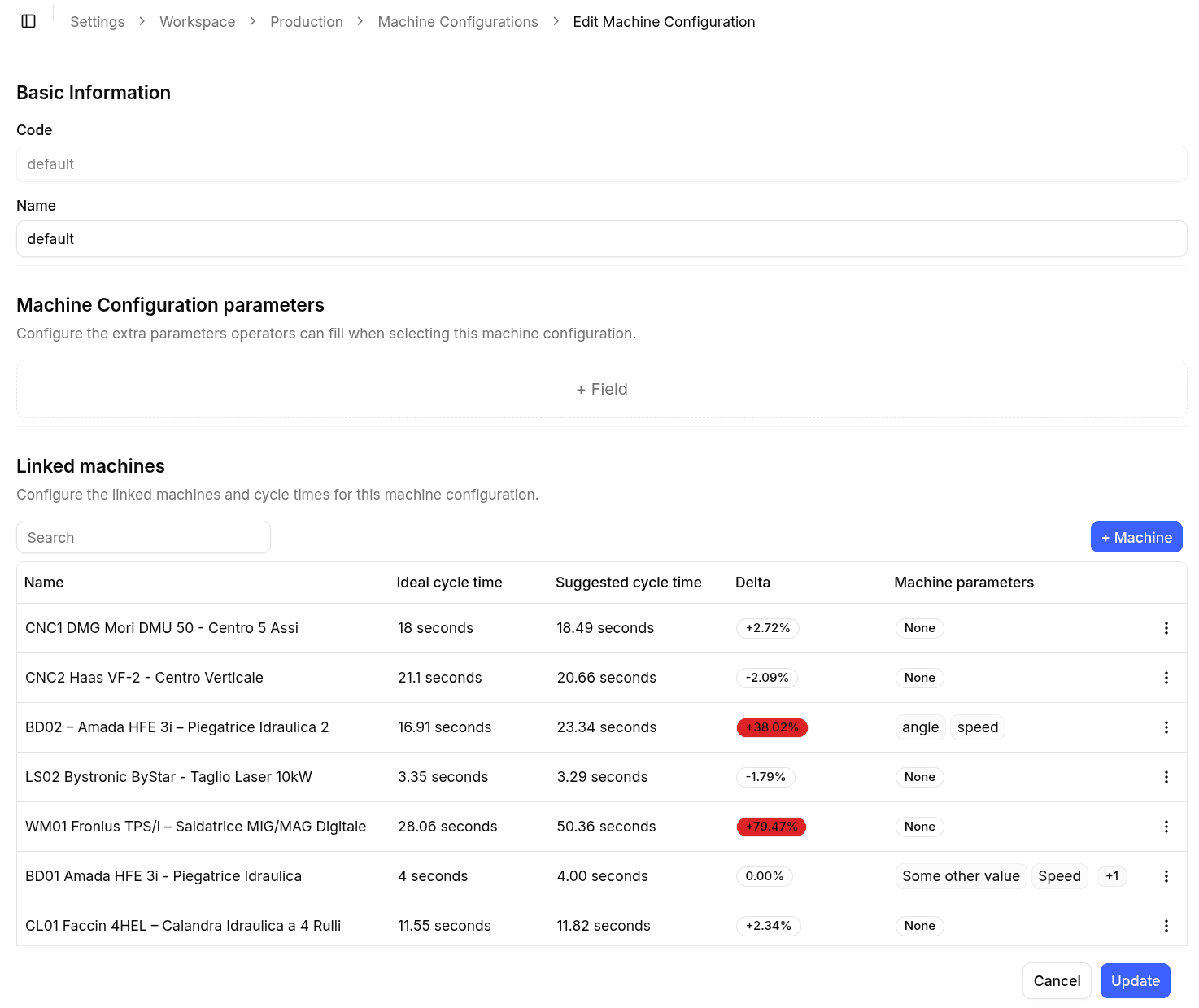
The Create and Edit forms share the same structure. When editing, the form is pre-populated with the current Machine Configuration.
Code
A required input that uniquely identifies the Machine Configuration.
- Cannot be empty
- Should follow company conventions
- Used by integrations and automation
Name
A required text input that defines the human-readable name of the Machine Configuration.
This name is displayed in:
- Dashboards
- Filters
- Productivity views
- Reports
- SOI selection flows
Parameters
This section is used to define additional parameters that belong specifically to the Machine Configuration.
Use asset parameters when the same input should be reusable across multiple configurations on the same machine. Use Machine Configuration parameters when the input is specific to one configuration only.
Linked Machines
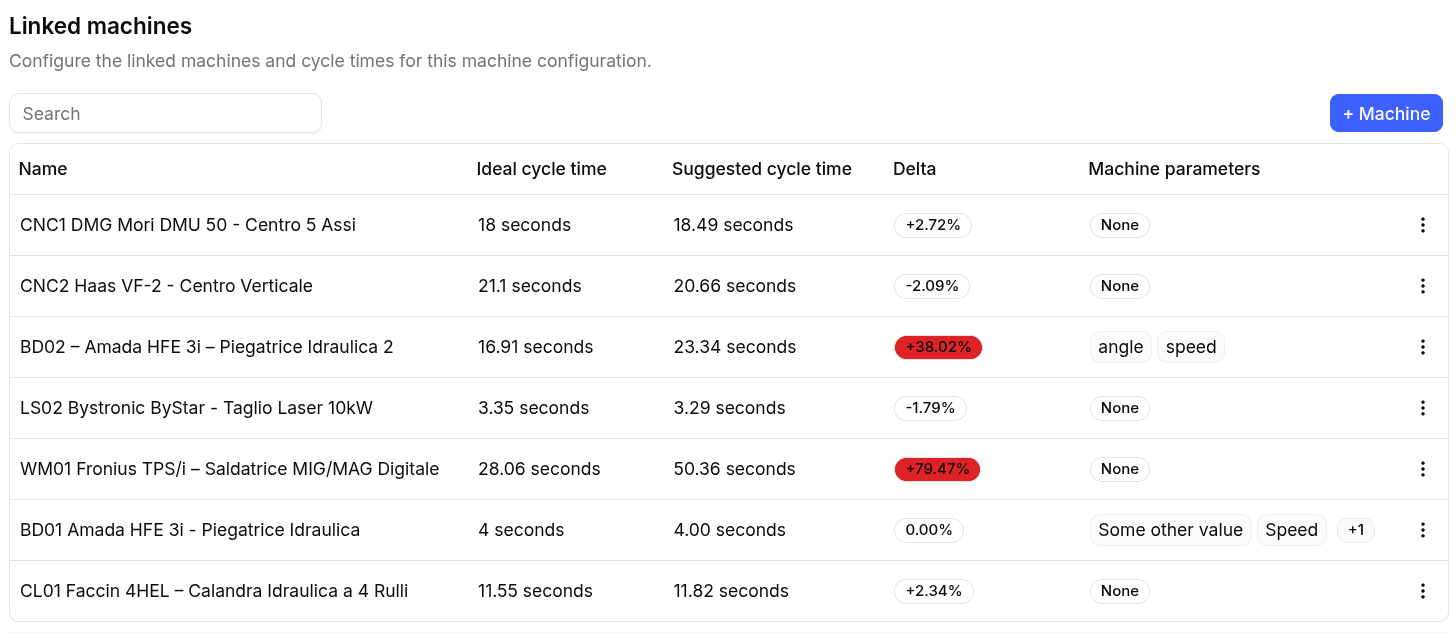
Each Machine Configuration can be associated with one or more machines.
For each linked machine, you can configure the ideal cycle time, which represents the expected duration of one production cycle for that Machine Configuration on that machine.
The linked machines table also shows:
- Suggested cycle time - A recommendation based on recent real production data
- Delta - The percentage difference between the configured ideal cycle time and the suggested cycle time
Cycle times are a key input for performance calculations.
Suggested cycle times are calculated from the last 3 months of production history for that Machine Configuration on that machine. This helps users review whether the current ideal cycle time is still aligned with real behavior.
Parameters in SOI
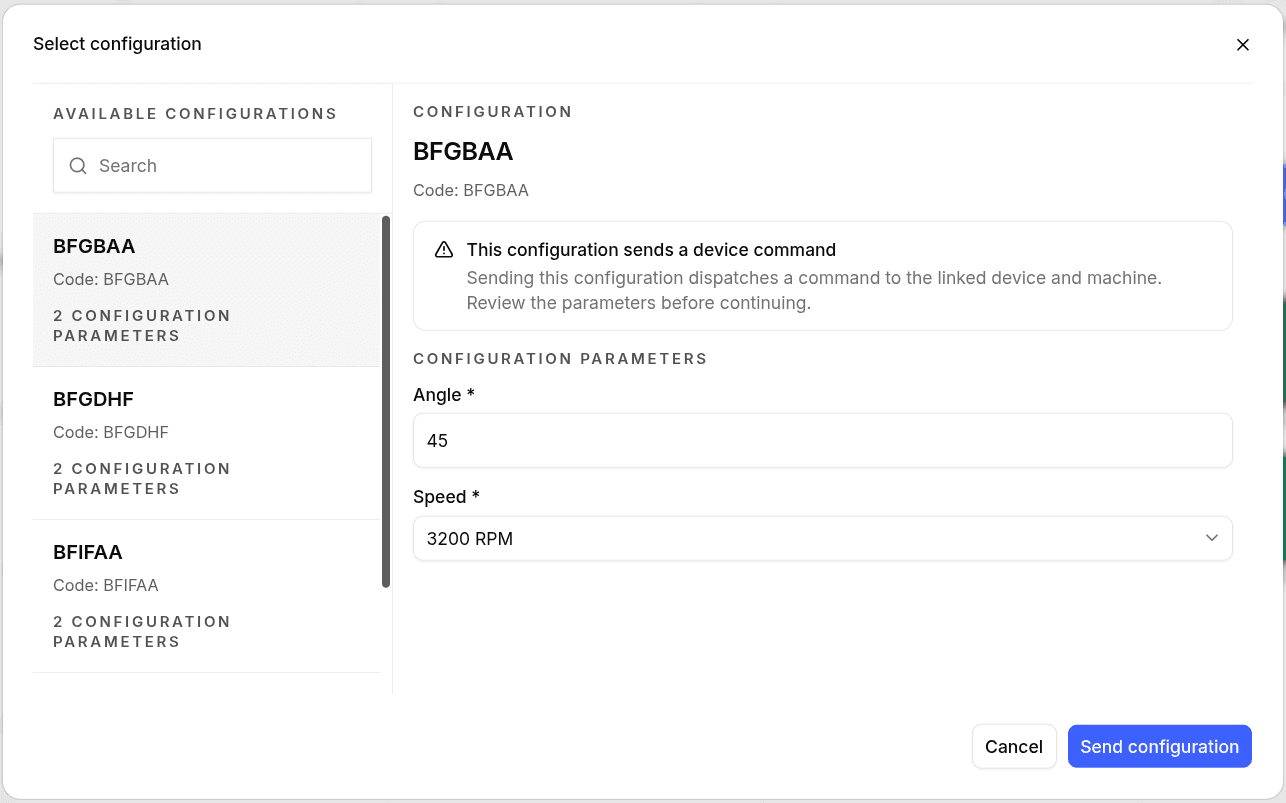
When an operator applies a Machine Configuration from SOI, the interface can prompt for parameters before the configuration is confirmed.
Typical flow:
- Search or select the correct Machine Configuration.
- Review the parameters shown for that configuration.
- Fill all required values.
- Confirm the configuration.
This keeps operator-entered data tied to the selected Machine Configuration instead of relying on external notes or manual follow-up.
Best Practices
- Model Machine Configurations around real machine behavior, not administrative labels alone
- Use stable and meaningful codes across systems
- Keep reusable inputs at the asset level when the same parameter is needed across multiple configurations
- Keep configuration-specific inputs inside the Machine Configuration itself
- Always verify ideal cycle times per linked machine
- Review suggested cycle times and Delta values when production behavior changes
- Review automatically created Machine Configurations and complete missing names