
Maintenance Plans
Define preventive maintenance plans and link them to machines in the current workspace.
Maintenance Plans
The Maintenance Plans section allows you to define preventive maintenance rules for machines in the current workspace.
A maintenance plan determines when a machine requires maintenance based on one or more expiration criteria, such as:
- Time (days)
- Working hours
- Production cycles
Each plan can be linked to multiple machines.
Maintenance Plans Overview
The main page displays a table listing all configured maintenance plans.
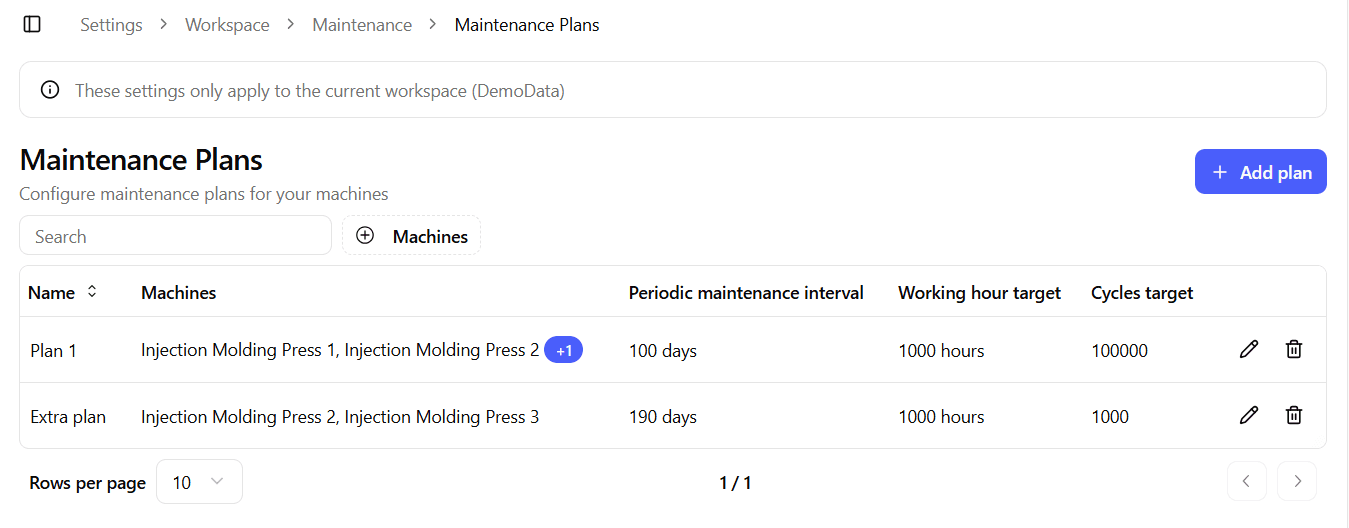
The table includes:
- Name – Name of the maintenance plan
- Machines – Machines linked to the plan
- Periodic maintenance interval – Expiration threshold in days
- Working hour target – Expiration threshold in working hours
- Cycles target – Expiration threshold in production cycles
- Actions – Edit and Delete buttons
From this page you can:
- Create a new maintenance plan
- Edit an existing plan
- Delete a plan
Create / Edit Maintenance Plan
The Create and Edit forms share the same layout.
When editing, the form is pre-populated with the plan configuration.
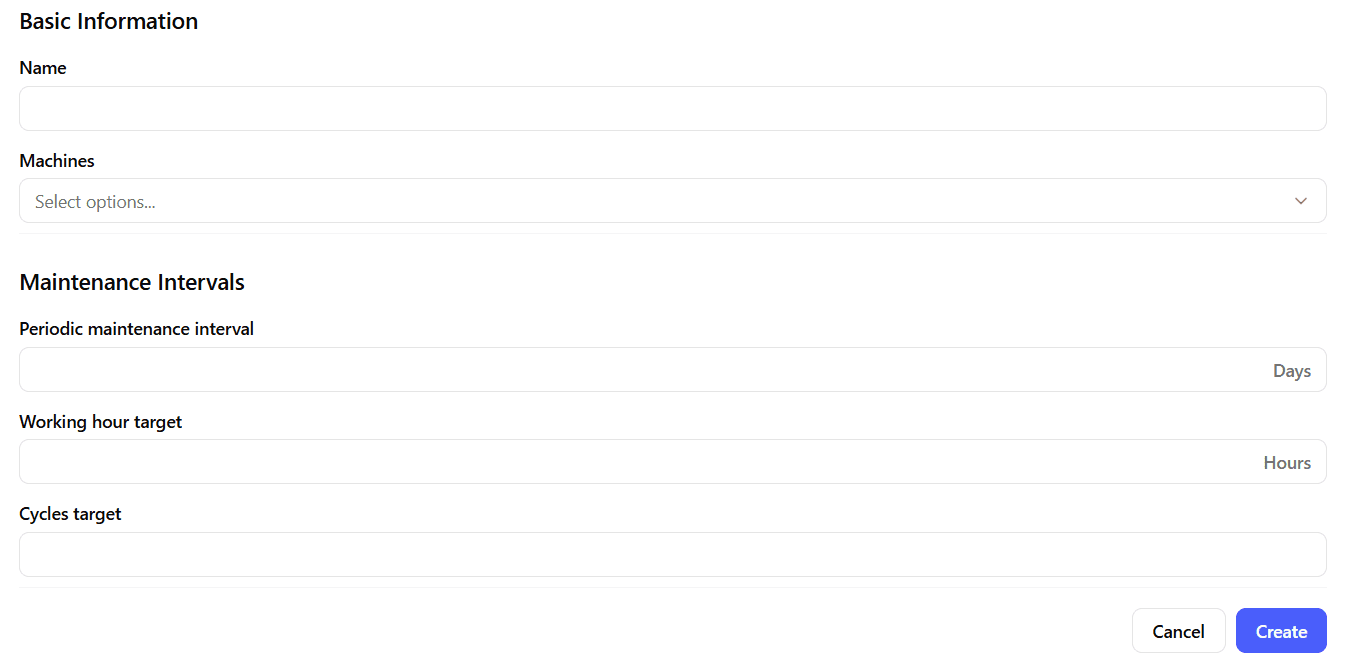
The form is divided into two main sections:
- Basic Information
- Maintenance Intervals
Basic Information
Name
A required text input that defines the name of the maintenance plan.
Use clear naming conventions, such as:
- Standard Preventive Plan
- High-Usage Maintenance
- Quarterly Inspection
Machines
Select one or more machines from the current workspace to link them to the plan.
- A single plan can apply to multiple machines.
- A machine can be associated with a maintenance plan to track its expiration conditions.
Only machines belonging to the current workspace can be selected.
Maintenance Intervals
A maintenance plan can expire based on one or more of the following criteria.
Periodic Maintenance Interval (Days)
Defines after how many calendar days the plan expires.
Example:
- 30 days → maintenance required every 30 days
Working Hour Target (Hours)
Defines after how many working hours the plan expires.
This threshold is based on the machine’s tracked operating hours.
Example:
- 500 hours → maintenance required every 500 working hours
Cycles Target
Defines after how many production cycles the plan expires.
This value must be an integer.
Example:
- 10,000 cycles → maintenance required after 10,000 completed cycles
Expiration Logic
If multiple thresholds are configured, the plan expires when any of the defined targets is reached.
This allows flexible strategies, such as:
- Time-based preventive maintenance
- Usage-based maintenance
- Hybrid approaches combining both
Best Practices
- Use separate plans for machines with significantly different usage patterns.
- Avoid setting unrealistic thresholds that generate excessive maintenance alerts.
- Review plans periodically to align them with actual machine behavior.
- Keep naming conventions consistent across workspaces.